Showing posts with label reader. Show all posts

Tuesday, May 13, 2014

Featured 5-13-2014: ReadWorks

About Us
 
ReadWorks is a national non-profit organization that provides free, research-based, Common Core-aligned reading comprehension curriculum.

ReadWorks

ReadWorks supplies units, lessons, and authentic, leveled non-fiction and literary passages directly to educators online to be shared broadly.The curriculum is based on the most highly regarded, proven research on reading instruction, and includes:
  • Informational and literary passages and question sets for grades K-8
  • Skill and Strategy lesson units for grades K-4
  • Comprehension (close reading) units for grades K-5
  • Novel study units for grades 5-6
ReadWorks is committed to "solving the nation's reading comprehension crisis by giving teachers the research-proven tools and support they need to improve the academic achievement of their students."
 
ReadWorks copy


The ReadWorks curriculum is aligned to the Common Core State Standards, the standards of all 50 states, and to top core reading programs. Each lesson page lists the standards that a specific lesson aligns to on the Standards Alignment tab. You can also edit your profile to automatically show the standards alignment for your state and grade.
 
DISCLOSURE OF MATERIAL CONNECTION: http://cmp.ly/0

Thursday, January 23, 2014

Featured: 1-23-2014 News-O-Matic

News O Matic

News-O-Matic from Press4Kids* offers children aged 7 to 11 their first daily newspaper. News-O-Matic produces five news stories each day, covering world news, science, sports, and more.

News O Matic 1
 
News-O-Matic readers also have access to history timelines, news games, interactive maps, and many other features. Readers also have the opportunity to rate the articles, ask questions, and submit drawings that relate to the news.
 
Each News-O-Matic article is aligned to the 3rd- and 4th-grade levels of the CCSS for English Language Arts and Mathematics. The articles provide students with necessary and exciting nonfiction content. The free daily Teacher Guide will indicate the precise correlations. Recall, comprehension, and discussion questions included within the guide will provide further practice. 
 
News O Matic 2
 
For schools without tablet technology, News-O-Matic will be accessible via a free daily School Version emailed in PDF format.  
 
Watch a video about News-O-Matic

News-O-Matic helps develop a daily reading routine while encouraging readers to become knowledgeable, global citizens.
 
*Incorporated in 2012, Press4Kids is a publisher of daily news applications for young readers built by journalists, educators, and entrepreneurs. Their goal is to inform children about current news and world events as well as to encourage them to read on a daily basis. All Press4Kids publications are 100% ad-free. 
 
DISCLOSURE OF MATERIAL CONNECTION: http://cmp.ly/0

Monday, March 18, 2013

Featured: 3/18/2013 Nota Reader [eBooks]


Nota is a collaborative platform where anyone can add videos, links, images, comments, and other content directly to the pages of an ebook.


The purpose of Nota is to advance any text beyond traditional print standards as well as current reader technologies, to allow an ebook to be more than just a digitized version of the original print book.

Latin for “note”, nota can be videos, or problem sets, or links to relevant web pages connected directly to an ebook page. Since anyone can add nota along with comments around them, the knowledge base can continue to evolve around the ideas on that page.


Furthermore, Nota is providing learners at the high school, college, and post-collegiate levels with their free STEM Fundamentals Catalog of textbooks to support all students. The catalog covers a variety of STEM subjects and grade levels, complete with rich video, web content, and problem sets.

DISCLOSURE OF MATERIAL CONNECTION: http://cmp.ly/0

Monday, March 11, 2013

Featured: 3/11/2013 Natural Reader [Text-to-Speech]


NaturalReader is a free iOS text-to-speech app that converts entered text, PDF files, MSWord documents, e-books websites and more into spoken words.

With NaturalReader, you can have any text read to you in one of over 30 natural-sounding voices. NaturalReader can be a great help to students with dyslexia or other reading difficulties. By listening to text rather than reading, some students may be better able to comprehend reading materials or detect errors in their work.


Since NaturalReader can help pick out mistakes in your work, as well as giving you a sense of the natural flow of what you have written, it is also an efficient proofreading tool.

NaturalReader features:

  • Works with Word documents, PDF files, web pages, eBooks, and many other formats.
  • Provides over 30 natural sounding voices in 5 languages.
  • Increase or decrease the speed of the voice reader.
  • Input text via keypad, copy/paste, or from the application’s built-in browser.
  • Load files from Dropbox, email attachments, computers via iTunes


Simply tap a sentence, and NaturalReader begins reading aloud from that point, and follow along with written text. Text automatically scrolls up the screen as it is being read.


NaturalReader Is free from the iTunes App Store. It is compatible with iPhone 3GS, iPhone 4, iPhone 4S, iPhone 5, iPod touch (3rd, 4th, and 5th generations), and iPad. Requires iOS 5.1 or later.

Note: NaturalReader requires a Wi-Fi Internet connection in order to transfer text and audio from cloud spaces.

DISCLOSURE OF MATERIAL CONNECTION: http://cmp.ly/0

Monday, March 19, 2012

COD - 3/19/2012 - Scholastic Storia [Reading]


20120312-xs6y87wt8y38c1r8n5ik5ngacw.jpg

Scholastic Storia is a free e-reading app for iPad created by the people at Scholastic. The design of Storia is intended to help kids learn to read in a fun and interactive way.

Scholastic Storia comes with five free books and access to a collection of children’s digital picture, chapter, and interactive books that are appropriate for ages 3 to 14.

Parents are able to set up individual bookshelves for each of their children, purchase new books for their children, and track each child’s progress through each book. Kids can customize their bookshelves and use a variety of features that help them read in an independent and engaged way.

20120312-c73psk9wmhe59i1fjxufg9ubgf.jpg

The editors at Scholastic carefully curate a wide and growing selection of books of all topics, so that kids can find the books that are just-right for their reading levels and interests. The Scholastic Storia app meets the reading needs and levels of each child, providing age-appropriate features that help develop reading enjoyment and proficiency:

  • audio narration and pronunciation tools
  • phonics and vocabulary activities
  • word games, story interactions, and animations
  • customized, age-appropriate embedded dictionary

More proficient readers can take notes, highlight text, and access contextual videos.

20120312-tg5cu2pysirs5jnmxqjish6fjt.jpg

Scholastic Storia's Parent Tools allow tracking of each reader’s activity and progression through each book with information such as what new words were learned, how many pages were read, and how long was spent reading each day.

DISCLOSURE OF MATERIAL CONNECTION: http://cmp.ly/0


Friday, August 13, 2010

Catch of the Day - B&N Desktop eReaders - 8/13/2010

The Barnes & Noble eReader desktop apps for PCs and Macs are excellent free eBook reading software.

20100807-ruh2duh5nxf9xsd54upux1cubx.png

With both you can shop for, purchase, and read eBooks in the .pdb format purchased from Barnes & Noble. You can also read any eBooks in the ePub format wherever you acquired them.

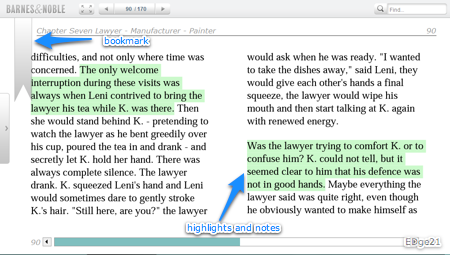
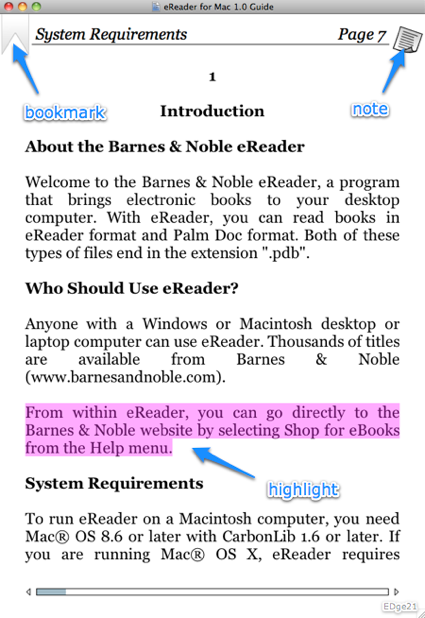
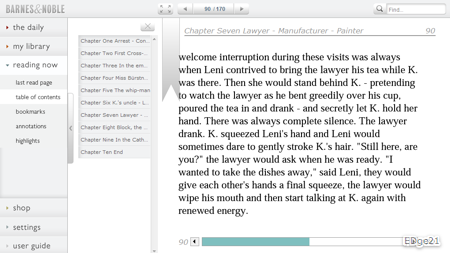
Add bookmarks, notes, and highlights to eTexts. Search the full text of books. LendMe™ Technology lets you share eBooks with others. Each version includes an onboard user's guide.

bneread2-1.png

eReaderforMac01-1.png

Though both the PC and Mac versions offer a pretty similar basic reading experience, the user interface and extended functionality of each differs dramatically from the other.

In the PC version ...

  • Support for touch screen computers and tablets running Windows 7
  • Read newspapers and magazines
  • Support for documents in PDF format
  • Add eBooks from your hard drive to your library for easy access

bneread0.png


In the Mac version ...

  • Open eBooks from anywhere on your hard drive
  • Export notes
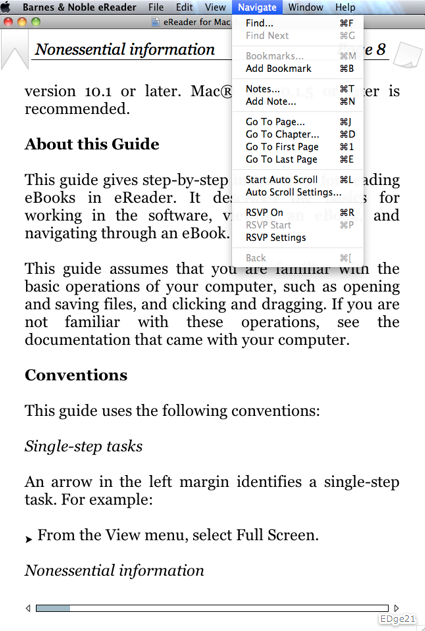
  • Customize virtually every aspect of the page display: fonts, colors, themes, line spacing, etc.
  • RSVP highlighted reading aid and Auto Scroll


eReaderforMac02.png

DISCLOSURE OF MATERIAL CONNECTION: http://cmp.ly/0

Wednesday, August 4, 2010

B&N NOOKstudy Now Available!

In a recent post, you were introduced to a free tool for students from Barnes & Noble, NOOKstudy.

NOOKstudy is now available for download here.

20100804-86cp1dq8yafmn2qjurhjra2e1.png

Get the free exclusive NOOKstudyKick-Start Kit including essentials like:

  • NOOKstudy's 50 Survival Tips – Information on everything you need to be successful both in and out of the classroom in college
  • SparkCharts – a course-in-a-chart, amazingly complete information on subjects from Research to Economics
  • Classic eBooks like The Scarlet Letter and The Inferno

icongoback.gif

Go to the previous post on NOOKstudy

DISCLOSURE OF MATERIAL CONNECTION: http://cmp.ly/0


Friday, July 30, 2010

Catch of the Day - Adobe® Digital Editions - Jul 30, 2010


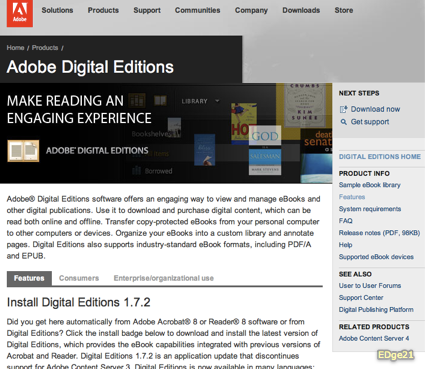
Adobe® Digital Editions is free cross-platform reading software for eBooks in PDF and ePub formats.

ade_logo.png

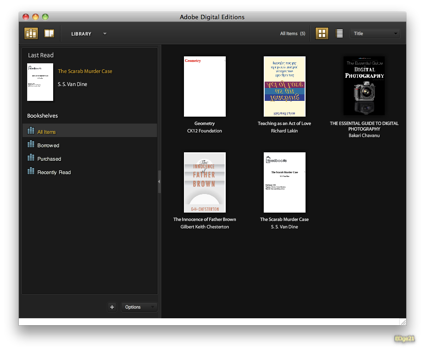
Adobe® Digital Editions software enables users to view and manage eBooks and other digital publications. Purchase and download digital content to read both online and offline. Organize your eBooks into a personal library and annotate pages.

ade_home.png

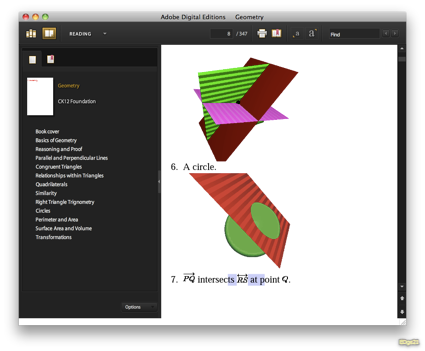
Adobe® Digital Editions implements a clean, well-organized interface, specially designed for reading digital publications. In Reading View, see bookmarks and a table of contents. PDF files can be displayed in a double-page, single page, fit-to-width, or your own custom view. You can change text size with ePub content.

Other features include …

  • Content portability, manage digital publications across multiple computers and devices
  • Add bookmarks to and search an eText in Reading View
  • Support for PDF and ePub documents and embedded SWF files
  • eBook borrowing  from many public libraries
  • Add eBooks from your computer to your library

ade_lib_view-1.png

Adobe® Digital Editions is currently offered in English, French, German, Italian, Spanish, Dutch, Brazilian Portuguese, Japanese, Korean, Chinese Simplified and Chinese Traditional versions and can display content in a wide variety of languages

ade_read_view-1.png

Adobe® Digital Editions can be deployed, maintained, and supported across your school system.

videoicon.png

Watch a video overview of Adobe® Digital Editions

DISCLOSURE OF MATERIAL CONNECTION: http://cmp.ly/0


Wednesday, July 28, 2010

Catch of the Day - B&N NOOKstudy - Jul 28, 2010

NOOKstudy is free eTextbook reader software coming from Barnes & Noble in August.

20100720-tby42b8iti6icsi73cjmpfdxj1.png

NOOKstudy keeps your eTextbooks and other class materials such as handouts and notes, organized and accessible right on your computer.

Multiple eTextbooks can be open simultaneously. With NOOKStudy, you can zoom in on full-color diagrams and pictures. Return automatically to the last page you were reading when you re-open an eTextbook.

20100720-fq2y78knrf1138qy7t31196jbw.png

What you can do with NOOKstudy ...

  • Organize your materials by course
  • Take notes directly in eTextbooks
  • Highlight, annotate, and tag content
  • Search the entire text of a book or your own notes.
  • Look up definitions or formulas using Google and Dictionary.com
  • Access over half-a-million free eBooks

The B&N NOOKstudyis currently being used and tested at Penn State, University of Nevada, Queensborough Community College, and the Rochester Institute of Technology.

NOOKstudy runs on PCs and Macs. A B&N Nook eReader device is NOT needed.

DISCLOSURE OF MATERIAL CONNECTION: http://cmp.ly/0


Monday, July 26, 2010

Catch of the Day - ePUB2Go - Jul 26, 2010

ePUB2Go is a web site that allows you to convert a PDF to an ePub file that can be read using a variety of ebook readers.

20100718-rkpxdx788qaaabpiemc3dnn3wf.png

Why would you want to convert a PDF formatted document into the ePub format? The primary advantage of the ePub format is that it creates reflowable text, which means the text display adjusts to a number of variables such as the size of the display, the font being used, the size of the font, and so on. Consequently, ePub formatted documents display better  on a wide variety of readers, including mobile devices.

ePUB2Go is very easy to use. There are only two buttons on the home page, The PDF is on my Computer and The PDF is on the Internet.

Click the appropriate button, tell ePUB2Go exactly where the PDF file is located, upload it, and in a short time you will be given the options of either viewing or saving the ePub file on your computer or having it emailed to your iPhone/iPod Touch/iPad where it can be downloaded directly into the Stanza ebook reader.

20100718-g9wsmcjenk5e1tn1gmb2x5ndfk.png

Other good ways to view ePub files on your iDevice include the DropBox and Box.net apps. However, you'll have to download the ePub file first to your computer and then move it to your DropBox folder or upload it to Box.net.

ePUB2Go is free to use and there is no software to install on your computer.

Notes:  The PDF must be no more than 30MB, only bitmap (non-vector) images are converted, and tables are not converted

DISCLOSURE OF MATERIAL CONNECTION: http://cmp.ly/0

Friday, July 16, 2010

Catch of the Day - CK12 FlexBooks - Jul 16, 2010


20100709-qeff1w7mtg7ubbabtjxh23fg1q.png

CK-12 is working to establish the development and distribution of quality educational content that can be a core text as well as to provide a flexible context for learning.

20100709-fw7r8kc5w275fhhgu44jwg5jcg.png

FlexBook is an open-content, web-based collaborative e-textbook model. FlexBooks download in the ePub e-book format. Currently there are free FlexBooks available in math, science, technology, and engineering. There are algebra, geometry, and calculus textbooks with teacher support materials. In science, you'll find e-textbooks for biology, chemistry, and physics.

I downloaded the geometry FlexBook. After a quick perusal, it appears to be an adequate base geometry textbook. The images below show how the geometry book renders in several e-book readers on different platforms.

B&N eReader on a MacBook (with highlighting, note, and bookmark)

ebooks,edge21

B&N eReader on a Windows netbook

ebooks,edge21

Adobe Digital Editions on a Windows netbook

ebooks,edge21

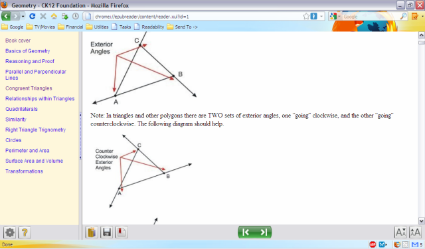
Firefox EPUBReader on a Windows netbook

ebooks,edge21

iBooks on iPhone 3GS

You can create and edit your own chapters or even entire FlexBooks.

videoicon.gif

Watch a CK-12 FlexBooksvideo demo

Register for an interactive webinar "Intro to FlexBooks!"

Friday, July 16th @ 12:00pm PST | Friday, July 23rd @ 10:00am PST

A non-profit organization, the CK-12 Foundation has an objective of reducing the cost of textbook materials for K-12 both in the US and worldwide.

DISCLOSURE OF MATERIAL CONNECTION: http://cmp.ly/0


Thursday, July 15, 2010

Catch of the Day - EPUBReader - Jul 15, 2010


During the past few days, I've been experimenting with a number of different methods for reading e-books (Barnes&Noble desktop ereader, iBook on iPhone, Adobe Digital Editions desktop, Stanza for desktop and iPhone, both Windows and Mac). I have found the best e-book desktop reader solution, in my opinion, is EPUBReader.

20100708-shr58xsf21nr8a4edxrms618i.png

EPUBReader is a Firefox add-on which lets you read e-books in the popular ePub format right in your browser. You don't need to install any additional software.

With EPUBReader installed, when you click on a link to an ePub file, the file is downloaded, processed, and displayed in a Firefox tab ready to read. Open and read previously downloaded ePub files using File-Open File… from the Firefox menu.

I have been testing the various readers with the CK12 Foundation's Geometry e-textbook. Click the thumbnail below to see an example of how well the special mathematical content is rendered by EPUBReader. I found this far superior to any of the other free e-book readers I tested.

A shortcoming of EPUBReader is the inability to annotate the e-text with highlighting and notes. You can add bookmarks, however.

20100708-ptmuydrdfp9pfwcg3i9hbrdxmg.png
EPUBReader is available in 23 different languages including English, French, German, Italian, Japanese, Portuguese, Russian, Chinese, and Spanish.

On a personal note, I no longer use Firefox as my browser of first choice. Unfortunately, I was not able to find a similar extension for either Safari or Chrome.

DISCLOSURE OF MATERIAL CONNECTION: http://cmp.ly/0

Wednesday, July 14, 2010

Catch of the Day - Bookworm - Jul 14, 2010


Bookworm allows readers to add ebooks in the popular ePub format to an online library. You can then read them in your computer's web browser or on your mobile device.

20100707-thfq8u1qwa8d9ti58ji2s37qe5.png

Simply upload any ePub formatted ebook to your Bookworm library. Read it by clicking its title on the main library screen. You can choose either a serif or sans-serif font, make the font larger or smaller, and navigate with keyboard shortcuts. (Note that Bookworm does not support books that include DRM).

20100707-kisu8tpunjt2qfeagujt1bcasu.png

If you have a portable e-reader device that supports the ePub format, you can download your books to your device. The Bookworm mobile site has been optimized for use with the iPhone and can export your books directly to the Stanza e-reader with just one-click.

As well as English, Bookworm is available in German, Spanish, Italian, Danish, Finnish, and Japanese.

20100707-49jssppcb24y8u9qakkw37dsd.png

documenticon.gif

Check out the Bookworm and ePub tour

Bookworm is free to use and there's nothing to download.

Note: I uploaded an etextbook with images and specially formatted text, but the images and special text were not included.

DISCLOSURE OF MATERIAL CONNECTION: http://cmp.ly/0


Tuesday, October 7, 2008

ReadTheWords.com

ReadTheWords.com provides a free service that will read any submitted text out loud. Choose from fourteen different readers in three languages. Listen to the reading online or download for iPod or other mp3 player. Post your reading into your web site or blog.
Try it here ...
Reblog this post [with Zemanta]

Monday, October 22, 2007

What Is this RSS stuff, anyway?

RSS, huh? There are differing opinions as to what the letters R S S stand for. And, it's not really important anyway.

RSS is the easy, efficient way to see the new things on the web that interest you. New information comes to you, you don't need to go out and look for it.

It's kind of like the difference between Netflix and the traditional neighborhood video store. If you want to see Young Frankenstein, you tell Netflix and in a day or two you'll find it in your mail box. Or, you drive to your local video store and hope they have it on the shelf. If not, you wasted your time and gas.

All you need is a feed reader. Some browsers like IE7 and Safari have built-in feed readers. There are also numerous desktop feed readers, many free like FeedReader or Omea Reader. The best feed readers are the Web-based readers like Google Reader and Bloglines. By using one of these, you can read your RSS subscriptions using any computer any place you have an internet connection.

Listen to a podcast What is RSS, Anyway?

A brief, rudimentary, one-page explanation of RSS with links to numerous resources ...

What Is RSS? RSS Explained - www.WhatIsRSS.com
NOTICE TO SPAM COMMENTERS
All comments to this blog are reviewed before being published. The chances of you getting a comment including ridiculously obvious "hidden" hyperlinks to porn sites or other spam published is virtually zero. So, save your time as well as mine, and take your tawdry business elsewhere.