![]()


![]()


![]()
DISCLOSURE OF MATERIAL CONNECTION: http://cmp.ly/0


![]()
DISCLOSURE OF MATERIAL CONNECTION: http://cmp.ly/0
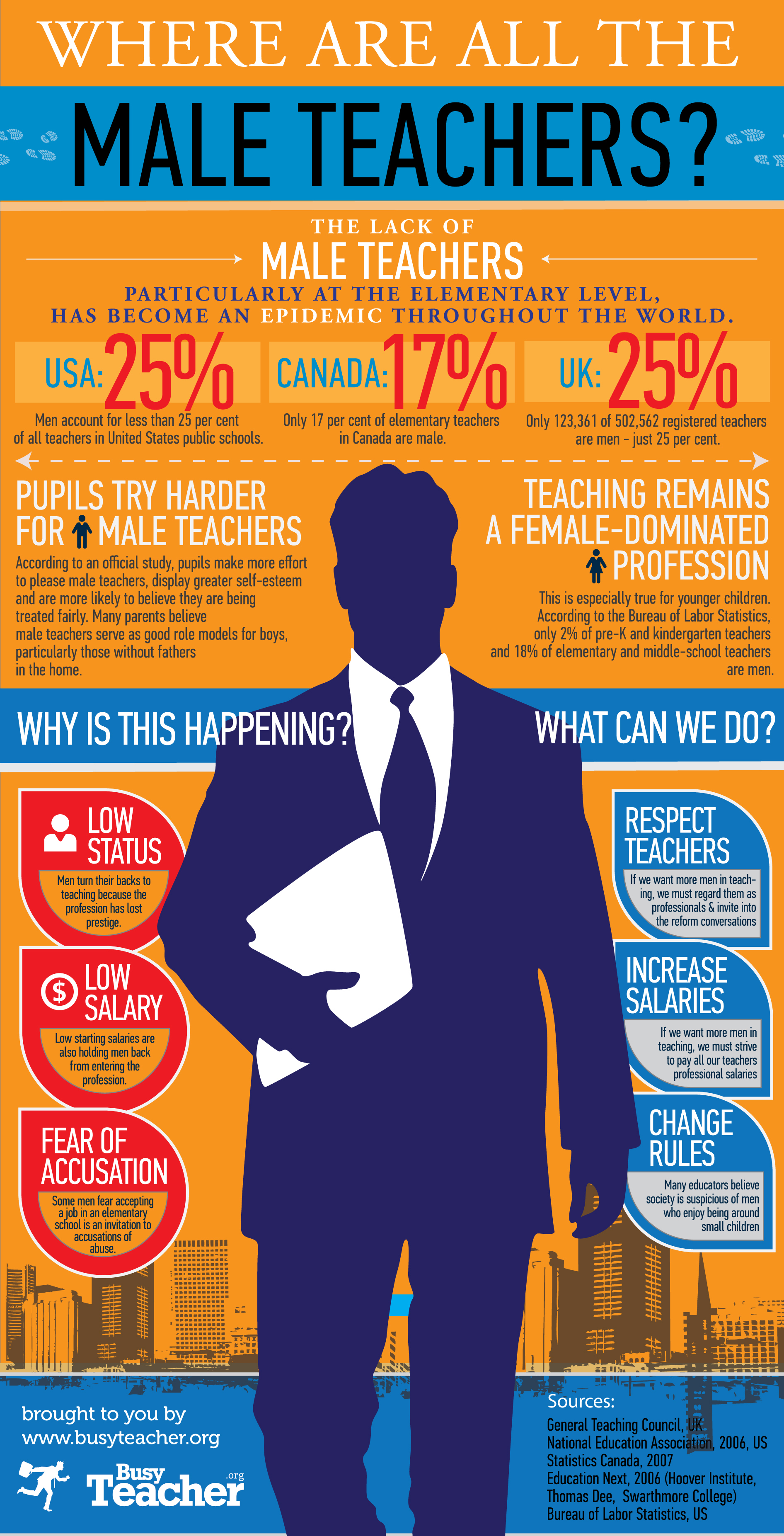
According to this infographic from Busy Teacher, the lack of male teachers has become a global epidemic.
The graphic includes statistics supporting this proposition, suggested reasons for it, and potential solutions.
Click the image for a larger view.
The Autodesk 123D family of apps makes it possible for users to design, make, and share 3D projects on the web, using a computer, or with an iPad.
Autodesk 123D includes five apps: Design, Make, Catch, Sculpt, and Creature.
The 123D Design web app can be used on any computer with access to the Internet. Or, create designs and play around with shapes on your iPad. Powerful but simple creation and editing tools allow you to develop more sophisticated designs.
Make awesome objects with 123D Make. Select from stock 3D models, then experiment with different configurations, or upload your own and try out various construction techniques. Print the plans yourself, cut-patterns and assembly instructions are automatically generated. Alternately, you may choose to have the parts cut precisely and delivered to you. Either way, you can then assemble your 3D project using simple tools like glue and pins.
Catch turns ordinary photos into 3D models. With Shape, push, pull, pinch, paint, smooth, grab, tug your designs into just what you want. Bulge, flatten, or refine your creation to achieve dramatic, comic, or frightening effects with Sculpt. Creature lets you design and 3D-print incredible characters right from your iPad.
Watch the video: Autodesk 123D: Create. Share. Make.
DISCLOSURE OF MATERIAL CONNECTION: http://cmp.ly/0
Storyboard That is an innovative tool to help visually communicate ideas and concepts to quickly tell a story.
Storyboard That was designed to be fun and easy to use, implementing a simple drag-and-drop interface with hundreds of pieces of clip art that can be used.
Storyboard That is a great tool for students to collaborate. Students can discuss what they want their story to say, how to structure it, and what imagery to use.
Watch the Storyboard That Intro
Storytelling by creating a story in Storyboard That can be fun and exciting. The experience of rapidly creating a storyboard that looks good and tells a story from the students' point of view can be stimulating and thought provoking.
DISCLOSURE OF MATERIAL CONNECTION: http://cmp.ly/0
This infographic from focus.com shows the relationship between education and earnings. A college degree is not necessarily a pre-requisite to having a well-paid career. Nor, does that degree guarantee a great income.

You have probably heard a lot of buzz about "flipped classrooms" and have wondered what exactly this phrase means. This info graphic from Knewton will help you better understand this new concept.

Created by Knewton and Column Five Media
Diagramly is another free web-based tool for easily creating many kinds of diagrams such as flow charts and organization charts.

Diagramly is freely and easily accessible. There’s no software to download and install. You don’t need Flash installed to use Diagramly, it's built entirely in HTML and JavaScript and runs in your browser.

The Diagramly interface is very much like a desktop application and is easy to learn and use. Two pretty conventional toolbars featuring familiar icons are docked at the top of the window. On the left is a collection of object libraries including basic as well as more specialized shapes. Simply drag an object out of a library onto the drawing canvas. Diagramly seems fairly quick and responsive.

![]()
Watch a video demo of Diagramly
No account registration is required to use Diagramly. Just visit the site and start creating diagrams instantly. Saves go directly to your hard drive and can be formatted as XML, PNG, JPG, or SVG. You can print directly from the app, too.
DISCLOSURE OF MATERIAL CONNECTION: http://cmp.ly/0

Diagramo is an HTML5-based (no Flash) web tool that allows you to create, edit and share diagrams with a user experience similar to desktop applications.

Diagramo can be used to create organization charts, diagrams, network diagrams, graphs, flow charts, and more.

No browser plugin or extension is needed in order to use Diagramo. Share your work and collaborate with anyone who has a web-connected browser. Export your diagrams as SVG, PNG, or JPG.
Watch a video demo of Diagramo
DISCLOSURE OF MATERIAL CONNECTION: http://cmp.ly/0
Speaking Image is a web tool for creating interactive images and sharing them with others.

Speaking Image is a web application which allows users to upload high-resolution images, add information to specific areas of the images, and use standard social network tools to interact with other users.
You can also create groups, add wikis, and control and manage collaborative work.

Find a list of video tutorials showing the basics on the Speaking Image help page and also on their YouTube Channel.

Things you can do with Speaking Image:
You need a modern browser with JavaScript support to use Speaking Image.
DISCLOSURE OF MATERIAL CONNECTION: http://cmp.ly/0
Are QR Codes the Next Big Thing? I see a lot of questions in my Twitter stream on this subject. Rather than spotlight a specific website or product, the Catch of the Day is a little different today. I'm going to try to provide some information and answers about QR codes.

A QR Code is a two-dimensional graphic code, readable by QR code readers, often using mobile phones. The code consists of tiny black squares arranged in a square pattern on a white background. Information such as text, a URL, or other data can be encoded in a QR code image.

Scanning this image will display the above paragraph on your phone.
QR (Quick Response) codes originated in Japan where they are very common. They initially were used to track parts in vehicle manufacturing. They are now used to take information from an impermanent media, such as a magazine, a sign, a label, or a a poster and move it on to your mobile phone. Once the QR code is on your phone, you may see textual information displayed, be linked to a URL, or import vCard contact info directly into your phones address book.
QR codes can store and digitally present much more data (including URLs, GPS coordinates, text, etc) than a standard one-dimensional barcode. Another advantage of QR codes is that instead of requiring a dedicated hand-held scanner to read them, many mobile phones can scan and read them inherently or with free third-party apps.
On my iPhone, I use I-nigma as well as ATTScanner, and ShopSavvy (all free in the iTunes app store) to read QR codes. A list of QR code readers for the iPhone can be found here. For other phones try this list.
The use of QR codes is free of any license and anyone can visit any of several free QR code generating sites to create and print their own QR codes for others to scan and use.
Free online QR code generators: QRnote, Kaywa, Delivr, GOQR.ME
The use of QR codes in the educational community is in its infancy, but growing here are a few sources of ideas for using QR codes in the classroom:
If you have a novel use for QR codes in your classroom or school, please note it and share it in the comments.
Sources:
Wikipedia entry "QR codes", http://en.wikipedia.org/wiki/QR_Code
Marc Lyne, What Is A QR Code And Why Do You Need One?, Oct 15, 2009, http://searchengineland.com/what-is-a-qr-code-and-why-do-you-need-one-27588
graph.tk is an open-source online graphing utility that plots mathematical functions and displays them in a visually pleasing format.

Some features of graph.tk:

graph.tk runs in any modern browser that supports the new HTML5 Canvas element.
DISCLOSURE OF MATERIAL CONNECTION: http://cmp.ly/0
Creately is a popular online, easy-to-use, high value diagramming tool focused on making it easier for teams to work collaboratively on all things visual.

Earlier this week Creately launched their new Desktop Beta. If you like the online experience of Creately, you may want to give the Desktop version a try.
Creately Desktop Beta features:

If you try Creately Desktop Beta now, you'll get a discount on the official version when it is released. Creately Desktop Beta will stop working and you'll need to upgrade to the release version. But, if you choose not to upgrade to a full desktop license, your diagrams will still be available on creately.com.
Creately Desktop runs on Mac, Windows, and Linux computers with Adobe Air installed.
DISCLOSURE OF MATERIAL CONNECTION: http://cmp.ly/0
With DataMasher users can mash up some government data to find out how states compare on important issues. Users can combine different data sets in interesting ways and create their own custom rankings of the states.

DataMasher helps users manipulate the voluminous amount of federal government data by creating mashups to visualize them in different ways and see how states compare. DataMasher is a tool that can be applied to situations where combining data sets and visualizing the result may be critical to understanding.

Most of the DataMasher data is pulled from Data.gov (an official website of the US government) and directly from federal government sites. Some comes from third parties that draw upon federal or state data sources.

Watch a video explaining DataMasher
DataMasher specifically states that they are not, of themselves, statistically rigorous. The validity of each mashup is the product of its creator.
DISCLOSURE OF MATERIAL CONNECTION: http://cmp.ly/0
The online creativity suite Aviary now offers a selection of its tools in a free, education-safe, private environment, Aviary Education.

With Aviary Education you can ...
The currently available tools are the image, vector, and audio editors and the music creator.
Aviary Education is presently on an invitation-only beta basis. You can request an invitation by clicking Request Free Beta and completing the form. An invitations will be emailed to you within a few days.
DISCLOSURE OF MATERIAL CONNECTION: http://cmp.ly/0