Showing posts with label computers. Show all posts

Thursday, August 15, 2013

Featured: 8-15-2013 Tynker

Tynker for Schools

Tynker is a computing platform designed specifically to teach children programming skills and computational thinking in a fun and imaginative way. 
 
Tynker
 
The visual nature of Tynker makes learning programming easier. Kids build games and mobile apps by manipulating blocks of code. The need to know programming syntax is removed. As kids learn fundamental skills, Tynker introduces more and more advanced concepts including syntax driven programming.
 
Tynker 1
 
For educators, Tynker Scholastic offers lesson plans, interactive tutorials, assessments, and class management tools for grades 3-8. Tynker's browser-based platform allows students to use Tynker anywhere they have internet access.


Tynker was created by experienced technology users to encourage their own children, as well as others, to understand and enjoy programming through building games and mobile apps, creating music, animating drawings, and more.
 
DISCLOSURE OF MATERIAL CONNECTION: http://cmp.ly/0 

Wednesday, August 14, 2013

Featured: 8-14-2013 Hopscotch / Daisy the Dinosaur

Hopscotch+Daisy

Hopscotch and Daisy the Dinosaur are two free iPad apps designed to help young children begin to learn to code.
 
Hopscotch is a free, visually appealing, easy-to-use programming language that allows kids to unleash their creativity and create their own games and animations.
 
Hopscotch 1
 
Drag and drop method blocks into scripts, then press 'Play' to see your code in action. As the student becomes more advanced, add more objects and use custom events, such as shaking and tilting the iPad, to run the code. 
 

 See a video about Hopscotch
 
Hopscotch requires iOS 5.0 or later.


Daisy the Dinosaur is a free, fun app with an easy drag-and-drop interface that kids of all ages can use. Students learn the basics of computer programming by animating Daisy to dance across the screen. 
 
Daisy the Dinosaur
 
Kids will intuitively grasp the basics of objects, sequencing, loops and events by solving this app's challenges. After playing Daisy, kids can choose to download a kit to program their own computer game.
 

 Watch a video about Daisy the Dinosaur
 
Daisy the Dinosaur requires iOS 3.2 or later.
 
DISCLOSURE OF MATERIAL CONNECTION: http://cmp.ly/0 

Tuesday, May 28, 2013

Featured: 5-28-2013 Scratch [Programming]

Scratch logo

Scratch, first noted on EDge21 in January 2010, is a simple programming language for kids that makes it easy to create interactive stories, animations, games, music, and art and share them on the web. 

Scratch

Working with Scratch helps kids aged 8-16 learn to think creatively, reason systematically, and work collaboratively, essential 21st century skills.

MIT has just released a new version of Scratch that runs within a browser window with no downloads or installs required. Note: Scratch does require Flash.

Scratch Project Editor

Find out more about learning with Scratch by visiting the ScratchEd online community where Scratch educators share stories, exchange resources, and ask questions.

 Watch a video introduction to Scratch

Scratch is a project of the Lifelong Kindergarten Group at the MIT Media Lab. Scratch is provided free of charge and is available in more than 40 languages.

DISCLOSURE OF MATERIAL CONNECTION: http://cmp.ly/0

Thursday, August 16, 2012

COD - 8/16/2012 - QwertyTown [Keyboarding]

QwertyTown teaches an essential aspect of literacy for today's students, keyboarding. QwertyTown reinforces skills through safe online communication, addresses Common Core literacy standards, is entirely web-based, and is customizable for learners with different abilities

Reasons educators use QwertyTown:

  • They understand the importance of keyboarding skills.
  • They can control student communications.
  • Students appear highly motivated and excel at digital assignments.
  • It’s easy to track student progress.
  • Lessons move at the student's pace.

Teachers and administrators are able to oversee and guide their students’ experiences in QwertyTown. Teachers can view full transcripts of their students’ Qmail messages and chats. They can add or remove individual students’ access to features of the Chatterbox, and can regulate who their students add to their Friends Lists.

Schools may sign up to try out QwertyTown with a free 30-day trial that includes one free teacher account and thirty student accounts. QwertyTown runs in Chrome, Safari, Firefox, and IE7+ and requires Adobe Flash Player 10 or newer.

DISCLOSURE OF MATERIAL CONNECTION: http://cmp.ly/0

Friday, June 10, 2011

RAM Tough: Chrome vs Safari

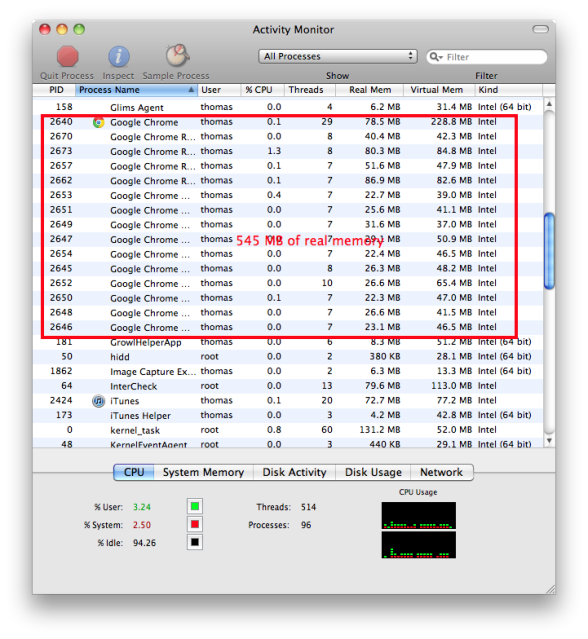
A few days ago, I read this Lifehacker piece, Take Control of Your Mac’s Memory Usage. I was surprised to read that when it comes to RAM usage the Chrome browser is "an absolute beast…. Because of the way that Chrome works, multiple sub-processes (called Workers) are run as you use it. It doesn't take very long for there to be a dozen (or more) of these Chrome Workers, and each one usually uses about 20MB of RAM. That's not all, though. Chrome also spawns other, more specialized worker processes called Renderers, and those can use anywhere from 90MB to 200MB or more, each. The longer you use a tab in Chrome, the more RAM it will consume, so try not to keep any one tab open too long."

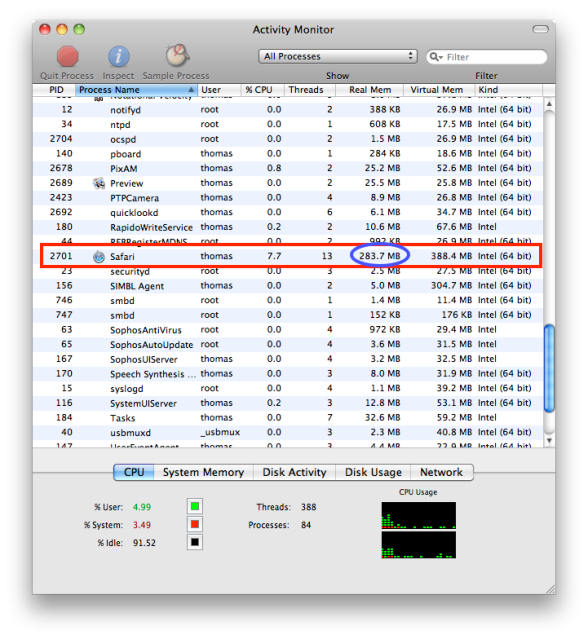
This morning I thought I'd do a quick little experiment to compare RAM use by Chrome versus by Safari. I am running the most current version of each on a dual core iMac with 2 GB of RAM. In each browser I had the same four tabs open: my NetVibes home page, Twitter, Instapaper, and a Google search results page.

As you can see from the screenshots below, Chrome used 545 MB of RAM, almost twice as much as Safari (284 MB).

chrome-am.png

safari-am.png

Take the results of this highly unscientific test for what they are worth to you. Safari has been my browser of choice, but I like Chrome and use it now and then, as I will continue to do.

Wednesday, October 27, 2010

Catch of the Day - Alice - 10/27/2010

Alice is a 3D programming platform whose intent is to make it easy to create an animation for telling a story, playing an interactive game, or making a video to share on the web.

20101019-ec6nuw2kkfytgp3qxfhttf54pe.png

Alice is a teaching tool for introductory computing. Students develop a program to animate the three-dimensional objects populating a virtual world. Alice implements 3D graphics and a drag-and-drop interface to enable students to have a more engaging, less frustrating programming experience. In the context of creating animated movies and simple video games, students learn fundamental programming concepts.

20101019-kt55beha9wq3nr112py91m1i2c.png

With Alice, students immediately see how their animation programs run, enabling them to understand the relationship between the programming statements and the behavior of objects in their animation.

20101019-n37kycpm7nd25dyyfc9e72bxhw.png

The Alice software includes an on-line tutorial and documentation system. There are several textbooks supporting Alice currently available from a number of publishers.

Alice 2is designed for students in high school and above. For middle schoolers there is Storytelling Alice. Alice is free from Carnegie Mellon University.

videoicon.png

Watch the video Alice: Programming for a New Generation

DISCLOSURE OF MATERIAL CONNECTION: http://cmp.ly/0

Wednesday, November 4, 2009

First Steps in Troubleshooting: A Flowchart


This flowchart will walk you through the initial steps you should take to try resolving a computer issue before you contact the IT department or or your "geek" friend.

Thursday, September 24, 2009

Are You an "Old School" Tech Star?

I tried to design a diagram that would illustrate how the nature of computing has transformed over the last several years. I wanted to demonstrate how some people who were on top of technology 5 years ago and genuinely believe they still are have really fallen by the wayside.
old v new

Saturday, July 11, 2009

The Computer History Museum: A Video Tour Plus

Located in Mountain View, CA, the Computer History Museum offers visitors the opportunity to see and experience one of the world's largest collections of computing artifacts. Their exhibits allow you to explore the computer revolution and its impact on the human experience.


The Commodore 64 is an 8-bit home computer released by Commodore International in August, 1982, at a price of $595 (US) with 64K of RAM and a 1Mhz processor. The C-64 is the all-time best selling single personal computer.

The Johnniac was an early computer manufactured in the early 1950's by the Rand Corporation in California. It was one of several computers inspired by the IAS computer designed by noted mathematician John von Neumann (after whom it was named) at Princeton's Institute for Advanced Study. It was removed from service in February 1966.

In 1956, the first IBM 305 RAMAC was shipped. The RAMAC was the first commercial computer that used a moving-head hard disk drive for storage rather than magnetic tape. More than 1000 systems were built before production ceased in 1961. Weighing more than a ton, it had a storage capacity of 5 megabytes.

IBM promotional video for the 305 RAMAC...


The SAGE system was developed by MIT in the late '50s with Air Force sponsorship to counter the threat of a manned bomber attack by the Soviets. It became operational by 1963 and remained in service until 1983. The project required over 800 programmers and the technical resources of some of America's largest corporations. With 60,000 vacuum tubes and weighing in at 250 tons, the SAGE system was the largest, heaviest and most expensive computer system ever built.

An Enigma machine is any of a number of advanced electro-mechanical rotor machines used for the encryption and decryption of secret messages. Several types of the Enigma machine were developed before and during World War 2. The most complex Enigma type was used by the German Navy. The machine has become well-known because Allied codebreakers were able to decrypt a huge number of messages which had been enciphered using the Enigma. The information gathered from this source was a substantial aid to the Allied war effort.


Reblog this post [with Zemanta]
NOTICE TO SPAM COMMENTERS
All comments to this blog are reviewed before being published. The chances of you getting a comment including ridiculously obvious "hidden" hyperlinks to porn sites or other spam published is virtually zero. So, save your time as well as mine, and take your tawdry business elsewhere.