Showing posts with label edit. Show all posts

Monday, January 20, 2014

Featured: 1-20-2014 Haiku Deck

Haiku Deck

Haiku Deck is a free iPad app that offers a simple new way to create inspired presentations for teaching a lesson or telling a story.

Haiku Deck 2

Intuitive touch controls let Haiku Deck users create, edit, and share presentations right on their iPads. Bold, clear visuals have been optimized for mobile displays. Haiku Decks can also be edited online in a browser and synched to your iPad.
 
Haiku Deck features: 
  • Choose from a range of stylish, professionally designed themes.
  • Multiline text layouts and font color choices for flexibility and variety.
  • Powerful image search puts millions of images at your fingertips.
  • Create beautiful pie charts, bar charts, and stat charts.
  • Streamlined numbered and bulleted list templates.
  • Import, crop, and reposition images from your iPad, Flickr, Instagram, Facebook, Dropbox, Google Drive, or Picasa.
In-app Public Notes lets you add context, supporting detail, and links to easily create a PDF handout or round out your slide content online. Capture talking points or a script with Private Notes.
 
Haiku Deck 1
 
View or present Haiku Decks with an iPad, a projector, a smartphone, or any web browser. Export to PowerPoint, Keynote, or PDF. Share decks via email, Twitter, Facebook, or embed in your blog or website.
  

 Watch an introduction to Haiku Deck
 
Haiku Deck is also available in German, Spanish, French, Italian, Portuguese, Chinese, and Japanese. iOS 6.0 or later is required.
  
DISCLOSURE OF MATERIAL CONNECTION: http://cmp.ly/0

Monday, January 13, 2014

Featured: 1-13-2014 eduCanon

EduCanon

Build and share interactive video lessons using eduCanon. Students can now become actively involved in what has traditionally been a passive experience.
 
EduCanon 1
 
eduCanon makes it possible to take any YouTube, Vimeo, or TeacherTube video content and embed rich, dynamic questions with explanations inside the video. As students watch the video, the content is segmented into more palatable components to increase student engagement.
 
You can discover quality content by searching through the eduCanon database of teacher-created video, or you can paste the URL of a YouTube, Vimeo, or TeacherTube video, such as screencasts, Khan Academy, Minute Physics, TED, NOVA, etc.

EduCanon 2

Any aspect of the lesson can be easily edited, even after you’ve built it, from the title, to the video itself, to the questions, and when they appear. 
 

 Watch an overview of eduCanon's Builder Environment Walkthrough
 
eduCanon Monitoring analytics can inform you about whether students actually watch the video (key to flipping classrooms), what concepts they struggled with, and who really needs help. 
 
eduCanon is a free web-based app and works on all major browsers, Google Chrome and Safari are recommended, however. It supports iPad use as well.
 
DISCLOSURE OF MATERIAL CONNECTION: http://cmp.ly/0

Wednesday, July 24, 2013

Featured: 7-24-2013 Paperkit

Paperkit

With Paperkit you can easily generate the exact type of graph/grid paper that you need, on the spot for free.

Paperkit 1

The Paperkit toolbar allows you to fully customize the settings for your specific needs. You have control over:

  • Spacing between grid lines.
  • Margin size.
  • Stroke color and width.
  • Paper size.

There are five paper formats available: letter, legal, tabloid, A4, and A3. You can choose either inches or millimeters. A live preview will help you visualize your design.

Once you have completed the design of your paper, the paper will open in a new browser window and you can print the graph paper immediately or save it as a PDF.

Paperkit 2

Paperkit has the tools to make custom grid paper, dotted paper, and lined paper that you can print and use right away or save for later.

DISCLOSURE OF MATERIAL CONNECTION: http://cmp.ly/0

Tuesday, July 9, 2013

Featured: 7-9-2013 WeVideo

WeVideo

WeVideo is a web application that allows you to edit videos online and collaborate on the editing process with others.

WeVideo 1

Edit anytime, anywhere, on any device with WeVideo's powerful cloud-based video creation tools.

Teachers can set up class video projects with WeVideo for Education, making relevant media available to each class. The educator can also group students, view and comment on their work, and monitor the progress of each video project.

WeVideo has three interface levels. It can be used both by novices that have never before edited a video, as well as more experienced editors and even experts. You can switch between modes at will, as you like.

Wevideo timeline

Unique Themes give your video a specific look and tone with a single click. Your video can be designed with professional visual effects, transitions, typography, and sound tracks.

 Watch WeVideo - Video Editing in the Cloud

Capture videos and photos and upload them into your WeVideo account using apps for your Android or iOS device. Mobile users who already use WeVideo can quickly transfer footage into online video editing projects.

For $100 (USD) per semester, up to 50 students can use WeVideo. Volume license pricing is available for multi-class, school, or district subscriptions at lower costs per student.

DISCLOSURE OF MATERIAL CONNECTION: http://cmp.ly/0

Monday, June 3, 2013

Featured: 6-3-2013 Empressr

Empressr

Empressr is a free online visual storytelling and presentation application that lets you create, manage, and share rich media presentations.

Empressr 2

You can upload your own media such as video, audio, images, and animations to your Empressr media library, import them directly from other sites like Flickr, Google, and Photobucket, or link to digital content from elsewhere on the web.

Empressr supports many popular file formats, including: jpg, gif, bmp, png, mov, flv, avi, swf, and mp3. The size of uploaded items is limited to 10MB.

You can upload a PowerPoint file to Empressr and use each of its slides as a picture or use it as a fully editable presentation (with some loss, however).

Empressr 1

Your presentations can be shared in several ways. You can make a presentation public on the Empressr site, email the link, use the share button to get an embed code, or choose to auto-embed into a number of social network sites like Facebook, Blogger, or WordPress, or place it on your own site. 

 Watch an Empressr tutorial

The Empressr team is located in New York and San Francisco. Empressr was developed to give users the ability to include more dynamic content like streaming video and Flash in presentations.

DISCLOSURE OF MATERIAL CONNECTION: http://cmp.ly/0

Tuesday, May 28, 2013

Featured: 5-28-2013 Scratch [Programming]

Scratch logo

Scratch, first noted on EDge21 in January 2010, is a simple programming language for kids that makes it easy to create interactive stories, animations, games, music, and art and share them on the web. 

Scratch

Working with Scratch helps kids aged 8-16 learn to think creatively, reason systematically, and work collaboratively, essential 21st century skills.

MIT has just released a new version of Scratch that runs within a browser window with no downloads or installs required. Note: Scratch does require Flash.

Scratch Project Editor

Find out more about learning with Scratch by visiting the ScratchEd online community where Scratch educators share stories, exchange resources, and ask questions.

 Watch a video introduction to Scratch

Scratch is a project of the Lifelong Kindergarten Group at the MIT Media Lab. Scratch is provided free of charge and is available in more than 40 languages.

DISCLOSURE OF MATERIAL CONNECTION: http://cmp.ly/0

Thursday, December 20, 2012

Featured: 12/20/2012 rvl.io [Presentations]


Create and deliver beautiful presentations, easily and quickly, right in your browser with rvl.io.


Easy editing of your presentations is the hallmark feature of rvl.io. The editor is easy to use, applying presentation styles to the slides as you edit them, so you'll know exactly what you're getting. Presentations are HTML documents so you can always tweak the markup yourself using the HTML editor.


Make sure things appear the way you want them with a wide range of themes and transitions to pick from. By default, your presentations are private, only you can see them. You can chose to publish your work which makes it openly available.


See a video demo of rvl.io

rvl.io resentations can be viewed in any modern browser, including mobile. Touch-optimised presentations are delivered to touch devices.

DISCLOSURE OF MATERIAL CONNECTION: http://cmp.ly/0

This is the last feature post of 2012. Feature posts will resume on Monday, January 7, 2013. HAPPY HOLIDAYS!!!

Saturday, November 17, 2012

Extra: ocenaudio [Audio]


ocenaudio is an easy-to-use, fast, functional, cross-platform,  audio editor from Brazil.


ocenaudio might be the perfect audio software for people who need an uncomplicated way to work with audio files. ocenaudio also has powerful features useful to more advanced users.

ocenaudio is loaded with features such as support for multiple file formats, spectral analysis, and audio signal generation, with a focus on usability, providing the user with a cohesive and intuitive audio editing and analysis tool. Time-consuming tasks such as opening and saving audio files, or applying effects, run in the background, so that you can work on other files.


ocenaudio is free and available for all major operating systems: Microsoft Windows, Mac OS X, and Linux.

DISCLOSURE OF MATERIAL CONNECTION: http://cmp.ly/0

Monday, October 8, 2012

COD - 10/8/2012 - LiveMinutes [Collaboration]

LiveMinutes is a free online collaborative meeting service focused on document sharing.

The most commonly used method of document sharing is by email, or perhaps Dropbox or some similar cloud-based solution. The documents are discussed on the phone with everyone looking at his own static version. The LiveMinutes team believes this process wastes time, and hinders effective collaboration.

LiveMinutes sharing allows everyone to videochat, looking at the same document at the same time, and annotating those documents in real time. 

With LiveMinutes conferencing, share up to 9 videos and conference for free. Join the call with your browser, Skype, or phone directly. The number is toll-free so there are no long distance charges.

A further feature of LiveMinutes is the generation of meeting reports that can be read online or downloaded as a PDF, so everyone can keep track of what was decided during meetings, and copies can be sent to those who could not participate. Your meeting chat and the audio conversation are recorded as well.

Watch a video walkthrough of LiveMinutes main features

If you are an Evernote user, your account can be connected to open and collaboratively edit your notes directly in LiveMinutes.

DISCLOSURE OF MATERIAL CONNECTION: http://cmp.ly/0 


Friday, June 10, 2011

Catch of the Day - LucidChart - 6/10/2011

LucidChart allows users to create, collaborate on, and publish attractive flowcharts and other diagrams from a web browser.

20110601-b1rhqakgtyreyr4mjn4tiykjgq.jpg

The LucidChart interface is designed to be clean and intuitive to both experienced diagrammers and new users. LucidChart is built on HTML5 and other web standards allowing for a uniform experience across different browsers and platforms (Flash is not required.)

20110601-x8rggd65ret7u4f9tw6cfiw42u.jpg

Collaboration is easy to set up and use. Collaborators can work on the same document simultaneously. Chat is built into the editor so users can chat with collaborators about changes. The revision history lets you see details of all the changes made to a document by anybody.

Publish a diagram to PDF or other image formats, publish it as a web page, or share it on Twitter or Facebook. Embed the diagram in a wiki, a website, or a blog and it will automatically update if changes are made in LucidChart.

20110601-ecix92f1ckhraihbr5u387hgms.jpg

LucidChart offers four pricing levels. The free plan gives one user 25 Mb of storage, 60 objects per diagram, and two collaborators. Paid plans range from $4.95 to $25(US) per month. LucidChart is currently being offered free of charge to educators who request an account for use in a class or department. These educational accounts are the equivalent of Team accounts and have all the premium features.

DISCLOSURE OF MATERIAL CONNECTION: http://cmp.ly/0

Saturday, January 29, 2011

Easy Clip Sharing with Dropbox

Have you ever been in a café browsing with your laptop and found an image, a URL, or some text you wanted to copy to use later at work or at home on a different computer?

20110129-m59f6899ech28fwkbwgxf8n6ii.jpg

Here's a quick, easy, free way to use your Dropbox account to do just that.

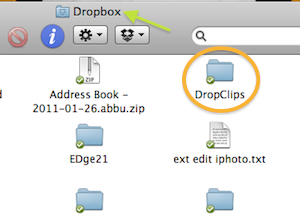
1. Make a new folder in your Dropbox folder to hold the items you clip. I named it DropClips for this example.

dropclipsindropbox.png

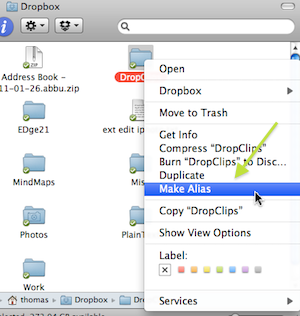
2. Right(Cmd)-click on the DropClips icon and select Make Alias.

makealias.png

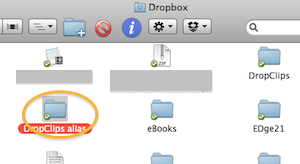
3. You now have a new folder named DropClips alias in your Dropbox folder.

aliasindb.png

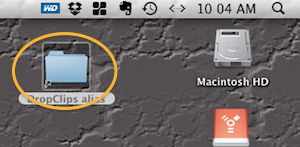
4. Drag the folder DropClips alias from your Dropbox folder onto the desktop of each of your computers.

dcondsktop.png

Now select any text, image, URL, etc that you want to copy and access from other computers and drag it onto the DropClips alias icon on the desktop. That clip will now be added to the DropClips folder in your Dropbox and be accessible from any other devices with Dropbox access.

(This how-to is Mac-specific, but I'm sure you can do something similar in Windows.)

Thursday, October 21, 2010

Catch of the Day - JustPaste.it - 10/21/2010

Easily paste, edit, format, and share text with JustPaste.it.

20101014-pmwsgxc11mtx6qi1fuekwsus6d.png

JustPaste.it's easy to use text editor preserves the text formatting and images pasted from other webpages or word processors.

20101014-dr2knwag8spucjs9gy5ax2tct.png

Other JustPaste.it features …

  • Edit in rich text or HTML
  • Add graphics to and embed videos in your notes
  • Use LaTeX to add mathematical formulas to the notes
  • Import files from Word, MS Works, or Open Office
  • Every 3 minutes your current text is saved to a server
  • Notes can be saved and downloaded as PDF files

20101014-bnjwdqk7k839tafrb6aebq1f4k.png

JustPaste.it lets you share text with friends or colleagues by simply pasting it on their site and giving them a unique link.

DISCLOSURE OF MATERIAL CONNECTION: http://cmp.ly/0

Monday, August 2, 2010

Catch of the Day - AudioExpert - Aug 2, 2010


AudioExpert is a free online audio editor, file converter, and sound recorder.

20100726-884i3h7r2n8iums7g3bk1wksgh.png

AudioExpert has the basic functionality needed to edit audio clips. It is also a powerful audio file converter which will allow you to change the format of your audio files, as well as their bit rate, frequency, etc. You can use AudioExpert to record sound, too.

20100726-b3991f7j75k3d7nb2jni9a4gdi.png

Main features of AudioExpert …

  • Analyze audio files and extract detailed information about the format
  • Cut or crop audio files in just a few clicks
  • Merge multiple files into a single audio track
  • Convert files between all of the popular audio formats
  • Convert multiple files at once with batch processing
  • Record and save audio using a microphone or another sound device

20100726-gm3c94ifyc85sp4axm2ynh52hr.png

AudioExpert supports the following file types: AAC, AU, M4A, MP3, OGG, WAV, WMA, and others. The total file size for the standard subscription plan is 150 MB.

DISCLOSURE OF MATERIAL CONNECTION: http://cmp.ly/0


Sunday, June 27, 2010

Aviary Education - Tools for Graphics and Sound

The online creativity suite Aviary now offers a selection of its tools in a free, education-safe, private environment, Aviary Education.

20100627-temd2b2bqrmj3f4idn6t5itd57.png

With Aviary Education you can ...

  • Create private student accounts
  • Manage assignments and projects
  • Use any of four selected tools
  • Access only school-safe content and images

The currently available tools are the image, vector, and audio editors and the music creator.

Aviary Education is presently on an invitation-only beta basis. You can request an invitation by clicking Request Free Beta and completing the form. An invitations will be emailed to you within a few days.

DISCLOSURE OF MATERIAL CONNECTION: http://cmp.ly/0

Tuesday, September 22, 2009

Catch of the Day - Myna Audio Editor - 22 Sep 09

Myna audio editor from Aviary is today's very fresh catch, released just last week.


With Myna you can remix music tracks and audio clips, apply sound effects, and record your own voice or instruments free online. No software to download.

Myna is a powerful audio editor that makes it simple and easy to upload, record, and remix audio clips online. Even if you are new to audio editing you can get started right away on Aviary.com.


Myna features:
  • Powerful Clip Editing - Trim, Loop, Stretch and Reverse your audio clips, width editable loop points, and interactive time stretch capabilities.
  • Automation - Easily add fade-ins, fade-outs, pan from left to right, and modify gain over time, with editable control points.
  • Effects - Add non-destructive effects to your audio clips including Pitch Change, Reverb, Delay, Parametric EQ, and more.
  • Import / Export - Import your own audio files, or search one of the provided libraries. Mix it down and export directly to your desktop or publish back to your account.
  • Share and Learn - Collaborate with other users. Follow step-by-step tutorials to learn new skills.

Aviary, based in Hewlett, NY, has created a suite of browser-based tools, accessible and free for all to use. Their stated mission is to "make creation accessible to the world." Aviary's online software offers anyone with internet access the ability to create digital content directly from their favorite browser.

Myna Demo Video


Along with the release of their online audio editor, Aviary announced a partnership with APM Music whose Quantum Tracks library containing thousands of professional stems, loops and beats can now be accessed by anyone using Myna to try for non-commercial purposes. APM Music is the largest provider of music for use in film, television, radio, video games and new media production.

Reblog this post [with Zemanta]
NOTICE TO SPAM COMMENTERS
All comments to this blog are reviewed before being published. The chances of you getting a comment including ridiculously obvious "hidden" hyperlinks to porn sites or other spam published is virtually zero. So, save your time as well as mine, and take your tawdry business elsewhere.