Showing posts with label storage. Show all posts

Wednesday, February 12, 2014

Featured: 2-12-2014 Easyclass

About Us

Easyclass is a new LMS (Learning Management System) for teachers and students designed to simplify materials, assignments, tests, grades, and more.

Easyclass
 
Easyclass allows educators to create digital classes where they can store the course materials; manage discussions; give assignments, quizzes, and exams; grade results; monitor due dates; and provide students with feedback.
 
Benefits of Easyclass:
  • Easy to learn and use.
  • Saves time.
  • Additional resources can be used to enhance learning.
  • Useful for Blended Learning initiatives.
  • Connect with like-minded educators to exchange ideas, get advice and share resources.
  • Stay connected with students.
  • Teach responsible digital interaction, good digital citizenship.
  • Students have easy access to assignments, class notices, and course content. 
Easy class

Each instructor gets 2GB storage space to store your course materials online and share with your students. Easyclass services are free and promise to remain free.


Easyclass  addresses the fundamental concerns of privacy and safety. There are no advertisements. Educators have full control of class management. Content created in the digital classes can be viewed only by the class members. 
 
DISCLOSURE OF MATERIAL CONNECTION: http://cmp.ly/0

Monday, November 18, 2013

Featured: 11-18-2013 Cometdocs Mobile App

Cometdocs 3 2
 
Cometdocs is a popular, free, online document management system that has served more than 3 million customers. Document sharing, transfers, and storage are among the many many free services it offers. You can now experience the benefits of Cometdocs’ features on your smartphones and tablets.
 
Convert Data 2
 
The Cometdocs mobile apps give you the ability to do document conversions to and from multiple formats on-the-go from iOS and Android devices. Transfer large files to anyone from your mobile device. There is no limitation on converted pages or size.
 
Find the document on your device, and open it with Cometdocs. The file is then uploaded to your Cometdocs account, after which you can choose the conversion type you desire. Shortly, the converted file will be available. 
 
Supported conversion formats:
  • Converting from PDF to Word, Excel, Images, HTML, and AutoCAD, OpenOffice, LibreOffice, Text, PowerPoint, and more.
  • Converting to PDF from numerous formats such as jpg, xls, xlsx, doc, docx, pptx, ppt, rtf, png, pub, and more
 
Your documents can be accessed from anywhere - your desktop browser, mobile phone, or tablet. Have them with you and ready to be edited or converted at all times. 
 
 
Cometdocs 2 2 
 
 See a short how-to-use guide for Cometdocs mobile apps
 
The Cometdocs app for iOS or Android is available free of charge. To use Cometdocs from your mobile app, you need to have a registered account.
 
DISCLOSURE OF MATERIAL CONNECTION: http://cmp.ly/0

Tuesday, April 24, 2012

Life in the Cloud Gets Even Better

Lots of news in the world of cloud storage today!

Microsoft released a new SkyDrive app for both Mac and PC, as well as an update for their previously released mobile apps. The Windows and Mac versions are both available for free. The desk/laptop version of the app appears to work very similarly to the desk/laptop version of Dropbox. You can add files to the SkyDrive folder and they will be uploaded the cloud.

SkyDrive's free storage limit is changing to 7GB, but if you are an existing SkyDrive user you can keep the 25GB you currently have, if you act now.


Google today launched Google Drive, a cloud service that lets you create, share and store your documents online. You can install Drive on your Mac or PC to upload videos, photographs, Google docs and more to Google's cloud, and you can download the Drive app to your Android phone or tablet. A Drive app for iOS devices is in the works.


Google Drive includes 5 GB of free storage, and upgrade to 25 GB for less than $2.50 a month. The service will launch with support for Windows and Mac desk/laptops as well as Android devices. An iOS client is in the works.


Less dramatic, but still significant, you can now send a link to any of the files or folders in your Dropbox. Once you’ve saved a file to Dropbox, just make a link to send to anyone you want to share with and they can simply view (but not edit)  most file types online — no download required. But just in case they want to save that file for later, they can choose to either download it or save it straight to their Dropbox.


DISCLOSURE OF MATERIAL CONNECTION: http://cmp.ly/0

Wednesday, January 25, 2012

Easy Clip Sharing with Dropbox

(This is a reposting of an earlier post from 1/29/11. I think it's a really useful tip and worthy of another look.)

Have you ever been in a café browsing with your laptop and found an image, a URL, or some text you wanted to copy to use later at work or at home on a different computer?

20110129-m59f6899ech28fwkbwgxf8n6ii.jpg

Here's a quick, easy, free way to use your Dropbox account to do just that.

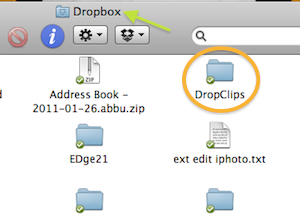
1. Make a new folder in your Dropbox folder to hold the items you clip. I named itDropClips for this example.

dropclipsindropbox.png

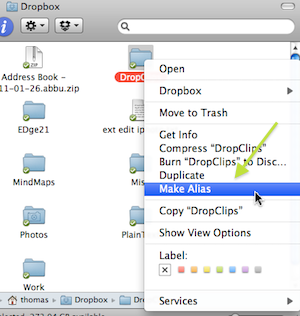
2. Right(Cmd)-click on the DropClips icon and select Make Alias.

makealias.png

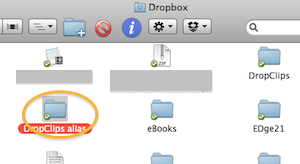
3. You now have a new folder named DropClips alias in your Dropbox folder.

aliasindb.png

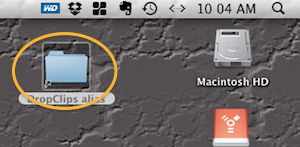
4. Drag the folder DropClips alias from your Dropbox folder onto the desktop of each of your computers.

dcondsktop.png

Now select any text, image, URL, etc that you want to copy and access from other computers and drag it onto the DropClips alias icon on the desktop. That clip will now be added to the DropClips folder in your Dropbox and be accessible from any other devices with Dropbox access.

(This how-to is Mac-specific, but I'm sure you can do something similar in Windows.)

Tuesday, January 24, 2012

CX: Cloud File Storage, Syncing, and More

20120124-8cgie6x657uh4ibqtaeuikpwri.jpg

CX is a new cloud-based file storage and syncing service, in the nature of Dropbox, that features secure storage, real-time syncing, public and private sharing, interactive group collaboration, and intelligent discovery.

20120124-dj4cqce31jqw5i4qmbge9fbqj.jpg

Organize your content, access it anywhere, share it with others, or publish it online using CX. Group functionality and a unique file commenting system enable team discussion of files.

Start with a whopping 10GB of free storage and add up to 6GB more by referring others. CX keeps your data safe with 256-bit encryption, redundant backups, and firewall protection.

20120124-j7451qhg5cymw6pu13wryi2rty.jpg

Choose from public or private file-sharing options. Every file has a comment stream. CX users can comment on shared files. Everyone in a group can enter into the conversation, edit files, or add new ones.

videoicon.png

See a video introduction to CX

CXDiscover lets you see what others are publishing. Find people with similar interests and join in conversations across the globe.

iphone2.png

There are CX application for Windows, Mac, and iOS, with Android and Blackberry expected soon.

DISCLOSURE OF MATERIAL CONNECTION: http://cmp.ly/0

Monday, October 24, 2011

Catch of The Day - ClassConnect - 10/24/2011

ClassConnect enables you to engage your students with interactive lectures, centrally organize all of your digital content, share with colleagues and students, and more.

20111017-jbiy5yhxhwyfawg58fshk6u5xr.jpg

ClassConnect was built from the ground up to meet the needs of teachers. It can be used just to manage your files or to build a full online learning community.

20111017-xb8qx74cjxrppq2wga9mbfctsk.jpg

ClassConnect features for teachers:

  • Upload files with a single click, store them forever, and share them with one click.
  • Create and deliver interactive lectures from scratch or import existing presentations.
  • Post messages for a whole class, get student feedback, and encourage peer-to-peer collaboration in a secure forum.
  • Organize in one integrated calendar that prioritizes tests, assignments, and projects from all classes.
  • Your students can sign up for text message reminders.
  • Short tutorials on the features help you quickly learn how things work.

20111017-qygdert6kxadyqn8d2eda4faai.jpg

videoicon.png

Watch a video intro to ClassConnect

Search 400,000,000 pieces of educational content using the simple ClassConnect search engine. Find videos, documents, presenttions, e-books, websites, and images then save them into your FileBox with just a click.

DISCLOSURE OF MATERIAL CONNECTION: http://cmp.ly/0

Monday, August 22, 2011

Web Downloads from Your iPad Straight to Dropbox

With this free web tool, URL Droplet, you can easily (well, sort of) download web files from your iPad or other mobile device directly into your Dropbox account.

First, copy the URL that links to the file you want to download - tap and hold the link text or image, then tap Copy.

20110822-p3ftb98qm2j8fhtsjuyufgkq8t.jpg

Go to http://urldroplet.com/ in Safari, or whatever browser you're using, and paste the copied URL into the box. Optionally, enter a name to save the file as, then click Save. The file will shortly appear in your Dropbox root folder where it can later be accessed from your computer or other device.

20110822-qktfx8ss2t1ruwxxyhxy3xwutu.jpg

Start a download from wherever you are, at work, in a cafe, on a bus, and it will finish saving the file to Dropbox on its own.

Note: You will need to give URL Droplet permission to access your Dropbox account.

DISCLOSURE OF MATERIAL CONNECTION: http://cpm.ly/0

Thursday, August 11, 2011

Catch of The Day - Share and Sync in the Cloud - 8/11/2011

Dropbox is a free utility that allows users to easily share and sync files across multiple computers and devices on nearly every operating system. Dropbox was first noted here in October 2009.

20110804-x5c7ca2hbyif3aw51w3bqtfk51.jpg

Using Dropbox eliminates the need to email files to yourself or your colleagues, or transfer them between computers using thumb drives or other physical media. With Dropbox, too, changes made to a file on one device will be effortlessly synced to that file everywhere else.

Though Dropbox may be the most well-known, prolific, and robust service of its kind, there are numerous other options for file sharing and syncing in the cloud. Here are four services worth considering.

20110804-xe6yx8en6duypneqaf5xhrkhej.jpg

SugarSync automatically syncs files and folders across multiple computers and operating systems. SugarSync has automatic, continuous, real-time backup for your files, accessible on their secure server from any computer or mobile device. Share any folder or file with friends and colleagues. You may chose to password protect the information and whether the recipient can only review or can edit the files. Their are SugarSync applications for iOS, Android, BlackBerry, Windows Mobile, and Symbian devices. SugarSync gives you 5 GB of free storage.

20110804-beh2m48et6gqiw6gd1xuqqmdsj.jpg

Windows Live Sky Drive allows users to create, edit, and share MS Word, Excel, and PowerPoint files online, even if Microsoft Office is not installed on your computer. Microsoft Office Web Apps work on many popular smartphones with Internet access, so you can be productive anywhere. Share files with friends and colleagues. You control who views your files. Sky Drive provides 25 GB of free personal storage.

20110804-fg92ia2eitpgd1qsk531k41qam.jpg

With YouSendIt, send and share files quickly and securely, sign documents and access your content anywhere. Manage your files from your computer with the YouSendIt desktop app for Windows (a Mac version is promised) or using the mobile app on your device. Use YouSendIt on the web to quickly and easily send files (even large ones), share folders, and sign documents from any browser. Users can invite colleagues and friends to share and collaborate. A unique feature of YouSendIt is the ability to securely sign documents online with your keyboard, mouse, or mobile touchscreen. YouSendIt offers 2 GB of free storage.

20110804-e5p58c1qinmeq16j57h9s39k4g.jpg

Manage content intuitively with Box.net. Organize and view files in a familiar folder structure. Share files and folders, including large files, securely with web links. Mobile access is easy using Box.net mobile apps for iOS, Android, and HP TouchPad. Many mobile apps such as GoodReader, QuickOffice, DocsToGo, and more can directly access Box.net. Box.net provides 5 GB of free storage.

All of these services are structured on the freemium model and provide the option to add more storage and features for a fee.

DISCLOSURE OF MATERIAL CONNECTION: http://cmp.ly/0

Saturday, August 6, 2011

iWork, Dropbox, and Box.net (iOS)

Did you know you can directly connect iWork apps on your iOS device to your Dropbox and Box.net accounts? It's easy using WebDAV, a set of methods based on HTTP that facilitates collaboration between users in editing and managing documents and files stored on web servers.

20110806-mcwfjr955b13ttx6fxq9xp9daf.jpg

DropDAV (Limited) is a simple way to allow access to your Dropbox files via WebDAV. It was made it to allow the iPad Pages, Numbers, and Keynote apps to read files from and write files to Dropbox. You'll need to link your Dropbox account to this service, then choose a unique password.

NOTE: You can only upload/download files of up to 1MB in size through WebDAV (Limited).

photoqd.png

You can connect to your Box.net account similarly, but no third-party service is needed. When connecting to Box.net the URL for the server should be set to http://box.net/dav/

DISCLOSURE OF MATERIAL CONNECTION: http://cmp.ly/0

Thursday, August 4, 2011

Catch of The Day - MiMedia - 8/4/2011

MiMedia brings a new approach to online backup providing a way to not only secure your files, but to also allow you to access and share your data, photos, videos, and more all in one place.

20110728-e9fak3u871th8geuuxkbfm7s4a.jpg

MiMedia lets you:

  • Stream, watch, and listen to your media on demand
  • Effortlessly share photos and videos
  • Quickly upload via the Shuttle Drive™
  • Automatically backup online via broadband
  • Securely store your digital stuff

First, you'll need to download and install the MiMedia desktop app for Windows*. Use your broadband connection or MiMedia's free Shuttle Drive service. Shuttle Drive makes for a faster and easier initial back up of your files. MiMedia will deliver a Shuttle Drive to you shortly after you sign up. Plug it in and encrypted copies of your files back up to it automatically. When complete, put it back in the same box and return it using the enclosed shipping label.

20110728-c9skx4abh215su1ddfwfab2mbd.jpg

After the initial backup, MiMedia's client runs in the background and backs up your files in real time using your broadband connection to ensure that new files and changes to old ones are immediately secured in your online account.

20110728-fuqpgbekmyffd884kwj4sursyd.jpg

MiMedia users can watch videos, listen to your music, view photos, and access documents any time they like, from any Internet connected device. Share photos and videos with just a single click. Send an email link to friends, upload a photo album to Facebook, or post photos and videos to your favorite social network.

videoicon.png

Watch the video How MiMedia Works

A free MiMedia account gives you 7 GB of storage. The Premium plan gives you 250 GB of storage for $99(US) annually. There is no limit to the number of computers, drives, or devices you can back up.

*MiMedia for Mac OS X is planned for later in 2011.

DISCLOSURE OF MATERIAL CONNECTION: http://cpm.ly/0

Monday, June 20, 2011

Catch of the Day - DropVox - 6/20/2011


DropVox is an iOS* app that records audio and sends it directly to your Dropbox account in high quality .m4a format.

20110614-eyyiakeh25q3xt81y5kw6edxek.jpg

With DropVox, capture your spoken ideas, reminders, or lectures. You can later listen to your recordings on your computer or mobile device anywhere that you can access your Dropbox account.

You can put your recordings into your Public folder to share with colleagues and students. Record actual classroom audio and make it available to students for review or to absent students.

20110614-ru7jhe8qpkrhk48f6bbf48fgeq.jpg

More DropVox features:

  • Upload finished recordings in the background, so you can continue working with other applications
  • Start recording immediately when DropVox launches, a single click operation
  • Continue recording while DropVox is in the background or your device is locked

DropVox is $1.99(US) in the iTunes App Store.

DropVox requires a Dropbox account. If you don't yet have one, get a free account here.

*Note: Android users may want to see this post from the DropBox blog.

DISCLOSURE OF MATERIAL CONNECTION: http://cmp.ly/0


Sunday, May 22, 2011

Quick, Simple File Sharing with Go Pileus

Go Pileus is a quick, simple, cloud-based file-sharing service. Drag-and-drop files onto the Go Pileus web page. Once uploaded, you will be given a short-url ready to share with anyone.

20110522-mpbsnr9w8n75f855rmr9fwyta7.jpg

Users create a box and use it to keep files sorted and easy to find. You get 1 Gb of free storage with a maximum 50 Mb file size.

DISCLOSURE OF MATERIAL CONNECTION: http://cmp.ly/0

Wednesday, March 9, 2011

Enhancements and Improvements for eBackpack

Just last week I posted about eBackpack, a site providing safe and simple digital cloud storage for students and teachers.

20110224-xrfsg6ewjma1fr5gmabre7rym6.jpg

Today eBackpack announced several new features and improvements:

  • Expanded reporting with 7 total additional administrative and personal reports
  • Additional administrative controls over file types
  • Capability for administrators to see the screen the way a student sees it
  • Expanded class management functionality from the class pages
  • Multiple administrator support
  • Enhanced funtionality around file submission
  • eBox improvements to show file submissions to groups or individuals
  • Improved download link placement.
  • Additional videos and support articles
  • Language translation capability
  • Live chat functionality for teachers and administrators

eBackpack also promised more future enhancements...

  • Sorting within the eBox
  • New user interface inside the application
  • Assignments
  • Multi-file upload
  • More delegated administrative capabilities

icongoback.gif

Go to an earlier post about eBackpack

DISCLOSURE OF MATERIAL CONNECTION: http://cmp.ly/0

Thursday, March 3, 2011

Catch of the Day - eBackpack - 3/3/2011

eBackpack provides safe and simple digital cloud storage for students and teachers.

20110224-xrfsg6ewjma1fr5gmabre7rym6.jpg

eBackpack’s cloud storage space eliminates the problems of emailing files, using USB drives, and burning CDs. Students, teachers, and administrators can have their own cloud storage accessible from anywhere.

20110224-tk1kq25e7hr5m3t6nawdaifgfk.jpg

Share files, handouts, multimedia, and other materials easily with other teachers, with students, even with entire classes. Collect student assignments in your online homework drop box, make comments and annotations, and return them to the students with one click.

20110224-xp6rnkc8pjg2y54sucxrmwk6k.jpg

Watch a video: Getting Started with Cloud Storage - eBackpack

eBackpack provides multiple layers of protection for your data using SSL security, password protection, multiple disk redundancy, continuous back up, and storage in multiple locations.

DISCLOSURE OF MATERIAL CONNECTION: http://cmp.ly/0


Friday, December 3, 2010

Catch of the Day - DROPitTOme - 12/3/2010

Securely receive files from anyone directly to your Dropbox account with DROPitTOme.

20101119-expdxfxs31uqqe3q7ibjd87msi.png

DROPitTOme gives you a unique password-protected upload address. DROPitTOme will send you an email notification whenever a new file is uploaded. You can turn off the upload feature any time you don't want to receive any files.

20101119-j5y849928k2qwda8efgg6ytx5j.png

DROPitTOme works once you grant access to your Dropbox account. Dropbox then grants DROPitTOme permission to add a folder called DROPitTOme within your Dropbox account. All the files sent to you using DROPitTOme will appear in this folder. Your other Dropbox files and folders will remain untouched.

videoicon.png

Watch a video demo of DROPitTOme

Currently the maximum file upload size is 75MB. DROPitTOme is a free service. You can remove DROPitTOme from your Dropbox account at any time.

icongoback.gif

Go to an earlier post about Dropbox

DISCLOSURE OF MATERIAL CONNECTION: http://cmp.ly/0

NOTICE TO SPAM COMMENTERS
All comments to this blog are reviewed before being published. The chances of you getting a comment including ridiculously obvious "hidden" hyperlinks to porn sites or other spam published is virtually zero. So, save your time as well as mine, and take your tawdry business elsewhere.